


King James Bible (KJV)
4.78.34K Reviews
App Specs
- Version
- 3.3.22
- Updated On
- License
- Free
- Downloads
- 5,000,000+
- Developer
- Warp Studios Bibles
- Categories
- Books & Reference
- Platform
- Android
Screenshots
 Analysis by AppCompare
I found King James Bible (KJV) most useful when I treated it as a quiet, practical reading tool rather than a feature-heavy study platform. It is a free Bible app from Warp Studios Bibles, built around the King James Version, daily verses, offline reading, and a handful of study-oriented tools. After spending time with it, my impression is that its biggest strength is focus: it gets the text onto the screen quickly and remains useful when I am away from a reliable connection.
That simplicity also defines its limits. Readers who want several translations, extensive scholarly notes, audio content, or a highly customizable study workspace may outgrow it. For someone who already prefers the KJV and wants a straightforward reference on an Android device, though, it makes a convincing case. The app is free to install, rated for Everyone, and has reached over five million installs, which gives some context for its established place among mobile Bible readers.
Reading comfortably and finding the right passage
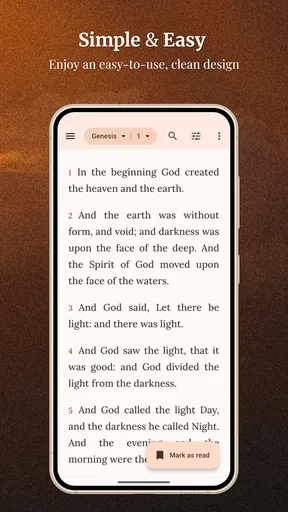
The first thing I noticed was how little effort it takes to begin reading. The app does not make me pass through a complicated setup before I can reach Scripture. That matters when I want to check a verse during a conversation, read a short passage before bed, or continue a habit during a commute. Its central purpose is immediately understandable: choose a book and chapter, then read.
The KJV itself has a distinctive rhythm, but its older language can be demanding. Words such as “thou,” “hath,” and “wherefore” are not difficult once familiar, yet they slow down first-time readers. This is not a problem the app can solve through interface design. In my experience, the cleanest way to use it is to read smaller sections, pause over unfamiliar phrasing, and use the study tools when a sentence needs more context rather than trying to rush through a long chapter.
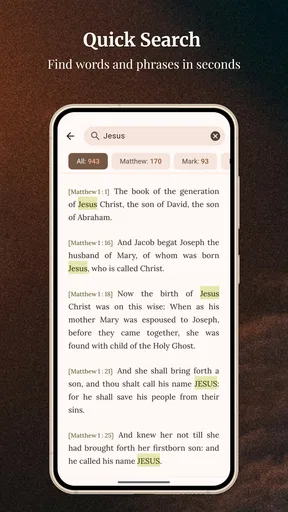
Navigation is most helpful when I already know roughly what I am looking for. Moving through the biblical books and chapters feels more natural than searching through a large general-purpose reference library. That makes the app especially suitable for regular KJV readers who remember a book, chapter, or familiar passage. Someone who recalls only a vague phrase may find a dedicated Bible search experience or a broader study app more efficient, depending on how much discovery they need.
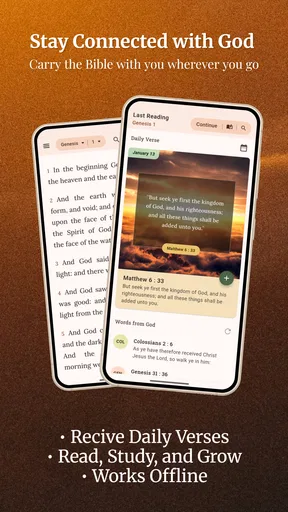
The daily verse feature gives the app a useful second entry point. Instead of deciding what to read every time, I can open the app and begin with a single selected passage. I see this as more practical than it may sound: a person trying to build a routine often needs less choice, not more. A short daily reading can become a starting point for opening the surrounding chapter, comparing related passages, or simply reflecting for a few minutes.
Offline access is another meaningful advantage. Once the relevant content is available on the device, I can read in places where mobile service is unreliable or unavailable. That includes flights, rural areas, underground transport, waiting rooms with poor reception, and locations where I prefer to keep the phone disconnected. It also makes the app more dependable than a browser-based Bible page, which may fail precisely when I need it.
Worth Reading Before You Choose

EA SPORTS FC Mobile 26 Is a Bigger Football Game, but It Takes Time

Flipboard Shows What News Apps Must Do Beyond the Feed

Switching to Android Auto Means Rethinking Your Driving Routine

Google Calendar Makes a Crowded Week Easier to Manage

Ludo King Makes the Most of the Minutes Between Plans

Baby Panda World Brings Quick Play to Modern Phones, but Its Game Library Feels Busy
There is a subtle trade-off here. Offline reading improves reliability, but it also encourages me to plan ahead rather than assume every online feature will be available in the same way. My practical habit is to open the app before leaving home, confirm that the passage I expect to use is accessible, and avoid treating it as a complete replacement for every kind of online research. For ordinary reading, that preparation is minor; for detailed study, it is worth remembering.
Text clarity is helpful, but the KJV remains the main challenge
On a phone, readability depends on more than whether letters are visible. Line length, contrast, spacing, and the amount of surrounding material all affect how long I can read without fatigue. This app benefits from keeping the Bible text at the center rather than surrounding it with a crowded social feed or a stream of unrelated recommendations. That restrained presentation helps me concentrate.
Still, readers with low vision should test the app on their own device before committing to it as their only Bible. Screen size, display settings, and the reader’s preferred text scale can change the experience considerably. I would not assume that a comfortable layout for one person will work equally well for someone who needs unusually large text, strong contrast, or a different typeface. The KJV’s punctuation and sentence structure can also require more visual tracking than modern translations.
For readers with dyslexia or anyone who processes dense prose slowly, the best approach is to use short sessions and avoid judging the app by speed. The daily verse can provide a manageable starting point, while chapter-by-chapter reading lets the user stop without losing the overall place. However, a modern-language translation may be the better choice if the primary goal is immediate comprehension rather than familiarity with the KJV.
I also think about older users who may not want to learn a complex interface. The app’s straightforward purpose works in its favor. A family member can be shown how to open a book, select a chapter, and return to reading without learning a large collection of menus. The main friction is less about the basic concept and more about the small controls and older language that can make extended reading tiring.
Using it with different abilities and in different situations
Accessibility is not only a question of formal settings. It is also about whether an app remains useful when a person is tired, distracted, offline, unfamiliar with the interface, or unable to use both hands. I found this Bible reader reasonably adaptable in several everyday situations because its main workflow is short. Open it, choose the passage, and read. That simplicity lowers the mental effort required to get started.
For users with limited dexterity, fewer steps can make a real difference. I can use it for a quick lookup without navigating through a complicated chain of screens. A person holding a phone with one hand on a bus, or using the device while recovering from an injury, may appreciate that the app is centered on a single reading task. At the same time, small touch targets and repeated scrolling can still be tiring, particularly during long chapters. I would use the phone’s own accessibility controls where needed and keep the app’s workflow as simple as possible.
Voice interaction may help some people reach the app or move around the device, but I would not describe the experience as voice-first. The app is fundamentally designed for visual reading and touch navigation. Users who depend on spoken content, audio Bible playback, or robust screen-reader feedback should investigate whether their device handles the app comfortably before making it their primary resource. A browser, e-reader, or dedicated audio Bible may be more suitable in that situation.
For people with hearing loss, the app’s text-based nature is naturally convenient because the core content does not depend on sound. That is a useful strength in quiet reading spaces, shared rooms, or environments where audio would be inappropriate. It also suits users who prefer to absorb Scripture visually. The opposite is true for someone who relies on listening rather than reading: the app’s central value is less apparent if spoken access is essential.
Users with attention difficulties may benefit from the lack of unrelated content competing with the passage. I can open the daily verse and stop there, or continue into a chapter when I have more time. This creates a flexible reading pattern instead of forcing every session to be long. My tip is to choose a specific purpose before opening the app—daily reflection, a verse lookup, or a chapter reading—because that prevents the simple interface from turning into aimless browsing.
In a shared household, offline reading also has a practical accessibility angle. A person with limited data, an inconsistent connection, or a device that is often used away from home can still reach the text. It is useful in community settings too, such as a small group meeting in a building with poor reception. I would still bring a printed Bible when a group needs several people to follow the same page at once, since one phone screen is not ideal for shared reading.
A realistic example is a caregiver taking a short break between responsibilities. There may be no time to prepare a study plan, and the phone may be on a weak connection. Opening the daily verse provides an immediate, low-pressure reading moment. If the passage raises a question, the reader can continue into the chapter and use the available study functions. That workflow is more realistic for a busy day than an app that expects a long, uninterrupted session.
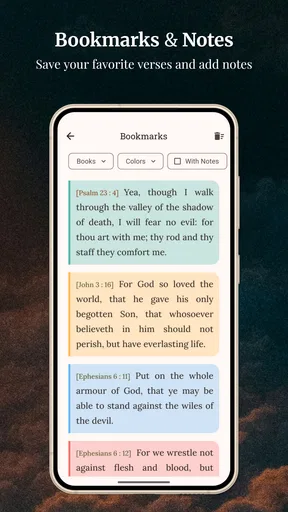
Students and new KJV readers may use it differently. They may need help understanding archaic vocabulary, locating parallel passages, or seeing how a verse fits into a larger argument. The study tools can make the app more useful than a plain text file, but I would not confuse them with a full academic commentary system. For serious coursework, a printed reference set or a study platform with multiple translations and extensive notes will usually provide better context.
The app is also a good fit for users who want a consistent translation rather than a menu of choices. That consistency can be valuable for memorization, church traditions, and personal reading plans. On the other hand, comparison readers should probably choose a different app as their main tool. If I need to place the KJV beside several modern translations, examine original-language resources, or compare denominational notes, switching between separate resources becomes inefficient.
Its current version is 3.3.22 and it runs on Android 5.0 or later, so compatibility covers many older devices as well as newer ones. That can matter for users who keep an older phone specifically for reading, travel, or limited-data use. I would still check the device’s own display and touch performance, because an app can support an operating system while the physical screen remains the real obstacle.
Where the experience still creates barriers
The largest barrier is not hidden behind a menu: it is the KJV’s language. Readers who expect contemporary English may interpret the app’s difficulty as an interface problem when the real issue is translation style. I would recommend it to someone who deliberately wants the KJV, not to someone who simply wants the easiest Bible text to understand. For the latter reader, a modern translation with explanatory notes may be kinder and more efficient.
The second barrier is the app’s focused scope. A focused reader is refreshing, but it means I cannot expect the same breadth as a large digital study library. People looking for sermons, community discussion, extensive cross-references, audio, or a broad catalog of translations may find themselves supplementing it with other apps. That is not necessarily a flaw, but it changes the total experience: this works best as a dependable KJV reader, not as an all-purpose religious research suite.
In-app purchases range from ninety-nine cents to three dollars and forty-nine cents per item. The free starting point makes it easy to try the reading experience before deciding whether any optional extras are worthwhile. I would approach those purchases carefully and judge them by a specific need—such as a study workflow I will actually use—rather than assuming every add-on is necessary for ordinary reading.
Some users may also want clearer control over how they read for long periods. If a person needs highly specialized typography, extensive color adjustments, unusually large text, or a reading mode designed around assistive technology, a dedicated e-reader may offer more dependable customization. The app can be perfectly usable for many people without meeting every specialized requirement. That distinction is important: basic usability is not the same as comprehensive accessibility.
Another limitation appears when I try to use the app collaboratively. It is excellent for holding a personal reading routine, but a classroom, study group, or church service may need shared annotations, synchronized passages, or presentation-friendly tools. In those situations, a printed Bible, a larger tablet, or a collaborative study platform may reduce friction. I would keep this app as my personal reference rather than expecting it to manage the entire group experience.
Privacy-conscious users may appreciate that offline reading reduces the need to depend on a live connection, but I still recommend reviewing the app’s behavior and device permissions in the normal way before installing it. I would not make assumptions about any app’s privacy simply because it reads offline. The practical point is narrower: once the text is available locally, reading does not have to stop when connectivity does.
The app has earned a 4.7 average from around fifty-six thousand ratings and has more than eight thousand written reviews. Those figures suggest that many people find the basic experience dependable, but they should not replace personal testing. A high average cannot tell me whether the text size works for my eyes, whether the KJV suits my reading level, or whether the navigation feels comfortable with my particular device.
Who should choose it, and who should look elsewhere
I would recommend this app to a reader who already wants the King James Version, values offline access, and prefers a calm reading experience over a large collection of extras. It is especially practical for daily verse habits, quick passage lookups, travel, low-connectivity areas, and older Android phones that still meet the minimum operating-system requirement. It also makes sense for someone who wants a free way to carry a familiar translation without bringing a physical book everywhere.
I would be more cautious about recommending it to a beginner who finds older English frustrating. The app cannot remove the interpretive work required by the translation. I would also point students, scholars, multilingual readers, and comparison-focused users toward a broader Bible study tool. They may still enjoy this reader for the KJV itself, but it is unlikely to be the only resource they need.
For users with visual, motor, hearing, or cognitive differences, my advice is to match the app to the person’s actual reading method. Visual readers who need a simple text-focused workflow may find it comfortable. People who depend on audio, advanced screen-reader behavior, extensive appearance controls, or collaborative tools should test it carefully and keep an alternative available. That is a fairer assessment than calling it universally accessible or inaccessible.
Warp Studios Bibles has kept the product centered on a recognizable need: reading the KJV without requiring a constant connection. The result is approachable and useful, but deliberately narrower than the most comprehensive Bible platforms. I like that trade-off when I want a passage quickly and do not want to be distracted by a large study ecosystem. I dislike it when I need modern-language clarity or several research tools in one place.
My final view is positive, with a clear condition attached. This is a strong everyday KJV reader, not a universal Bible solution. Its free access, offline reading, daily verses, and focused navigation make it easy to recommend to the right reader. Its older translation, limited scope, and potentially uneven fit for specialized accessibility needs mean that some people should choose a different tool or use this one alongside another resource.
If you know you want the King James Version, I would install it and begin with a short daily reading rather than judging it during a long session. Check whether the text remains comfortable at your preferred display size, try a passage while offline, and see whether the study tools match the questions you actually ask. For that audience, the app’s modest design is a strength. It stays close to the reading task and gives the KJV a practical place in everyday life.
Pros
- Classic
- widely recognized English Bible translation
- Includes the complete Old and New Testaments
- Works well for personal reading and Bible study
- Familiar wording for users raised with traditional Scripture
- Useful for sermons
- memorization
- and historical reference
Cons
- Archaic language can be difficult for modern readers
- Some passages may require additional historical context
- Search tools may feel basic compared with newer Bible apps
- Not ideal for readers seeking contemporary English wording
- Interpretation can be harder without study notes or commentary
FAQs for King James Bible (KJV)
What is the King James Bible (KJV) app?
The King James Bible (KJV) app is a digital version of the classic English translation of the Bible first published in 1611. It usually provides access to the Old and New Testaments, allowing users to read Scripture on an Android or iOS device. Depending on the specific app, it may also include bookmarks, notes, search tools, reading plans, audio narration, and offline access.
Can I use the KJV Bible app without an internet connection?
Many King James Bible apps allow users to download or access the complete Bible for offline reading, which is useful when traveling or when mobile data is unavailable. However, offline features can vary between applications. Audio versions, daily devotionals, advertisements, synchronization, and certain study resources may still require an internet connection, so it is worth checking the app description before downloading.
Is the King James Version Bible app free to download?
Most KJV Bible apps can be downloaded for free, but the available features depend on the particular version you choose. Some applications are completely free and supported by advertisements, while others offer optional in-app purchases for removing ads, unlocking audio narration, accessing commentaries, or adding advanced study tools. Always review the pricing details and subscription terms before confirming a purchase.
What features should I look for in a King James Bible app?
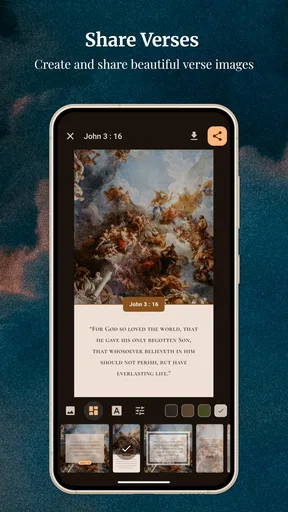
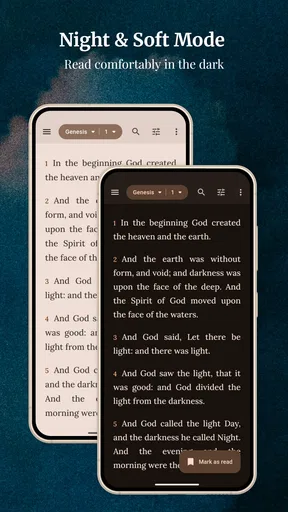
A good KJV Bible app should offer more than simple text display. Useful features include fast verse searching, adjustable font size, night mode, bookmarks, highlights, personal notes, chapter navigation, and the ability to share passages. Audio reading, reading plans, cross-references, daily verses, offline support, and cloud synchronization can also improve the experience, especially for regular study or devotional use.
Is the King James Bible suitable for modern readers and Bible study?
The King James Bible remains popular because of its traditional language, literary style, and historical importance, but its vocabulary and sentence structure can feel unfamiliar to modern readers. It is suitable for personal reading, memorization, worship, and study, although beginners may benefit from using a dictionary, commentary, or a modern translation alongside it. The app itself does not replace thoughtful interpretation or trusted study resources.


